Asfaar Burhaniyah 2.0

Asfaar Mubaraka of al Dai al Fatemi Syedna Mohammad Burhanuddin (tus) across the globe since 1424. (previous asfaar shall be added too insha allah as soon as possible.)The Placemark centered is the Current Location of His Holiness Dr. Syedna Mohammad Burhanuddin (TUS). comments are welcome.
Showing posts with label office. Show all posts

Thursday, July 17, 2008

MS Office Alternatives - Analyzed

InfoWorld did a good analysis of MS Office alternatives (Slideshow here). They picked couple of vendors from the cloud (Zoho and Google) and couple from the Open Source world (IBM and OpenOffice) and did some analysis to see if they stand any chance against MS Office. Full article is available here. Here is the summary.

InfoWorld Office Alternatives
Glad to see Zoho lead the pack (along with IBM) with our current apps.
Bottom Line:
If you’re ready to embrace the SaaS future, then Zoho could be the productivity suite you’ve been waiting for. Zoho can provide both personal productivity and business back-end applications, and with Google Gears, you can keep working on documents even if you can’t find the Internet. Zoho is the only suite here that you could easily use to run a complete business. It’s also the only one that can run virtually all the Excel macros you might have developed
The good news is, the applications are improving at a very rapid pace. If you have noticed, its been a while that we rolled out a new app. The focus lately has been more on integration between apps and enhancements to the existing ones. In the longer term, we think cloud based productivity suites can go far beyond desktop software. We’ll see this happen over the next year or two.
While InfoWorld looked at Word Processor, Spreadsheet and Presentation apps, the productivity suite goes beyond these three (Wiki, Email etc are others). Also, you’ll need more apps to run your business than a productivity suite. In the bigger picture, we are trying to build a suite of apps to run your business. As we often say, we want to be your IT Department.

Saturday, May 24, 2008

Microsoft Office 2007 Service Pack SP2 - Coming Soon

office-2007-sp2-documents Here’s a quick summary of upcoming changes in Microsoft Office 2007 SP2 with regards to document formats:

1. With Office 2007 SP2, you will be able save documents to Adobe PDF format without requiring external plug-ins.

Microsoft Office 2007 will still not be able to read content from your PDF files so Adobe Reader is safe.

2. Like PDF, Office 2007 will also let you save documents in ODF format which is used by OpenOffice and is supported by almost every web office suite.

3. Unlike PDF, you will be able to open OpenOffice documents in Office 2007 for reading and editing.

4. Office 2007 customers will get an open to set OpenOffice as the default document format. That means when you hit Ctrl+S inside Microsoft Word, the first choice will be .odt.

5. The expected release date for Microsoft Office Service Pack 2 is 1H 2009.

Via Digital Inspiration

Friday, May 23, 2008

Zoho Writer Updates with Page Setup & Page View Options

Zoho Writer provides you with quite a few page setup options. For accessing them, click on the Page Setup icon page-setup-1.jpg (third from left, first row of the Zoho Writer toolbar). The pop-up window has 3 tabs marked General, Header & Footer.
In the General tab, you can set the font face, font size, page bg color, top/bottom & left/right margins, paper size, direction (those in the Middle-East can set right-to-left for Arabic, Hebrew, Urdu etc) & line spacing. All these properties can be set for each document by default. And if you want this to be applied to every new document you create, you can check the ‘Make it default for All New Documents‘ checkbox.

In the Header and Footer tabs you can choose what to display in the Left, Middle, Right areas of the Header/Footer sections of a document.

And the icon adjacent to Page Setup is Page View. Use it to see how your page will look while it’s printed - both width-wise & length-wise (where a page ends & the next one begins). The Page View is in Read Only mode currently & we will be extending this option to Edit mode soon.

Use the above options while drafting your documents in Zoho Writer & let us know in the comments below of how it went.

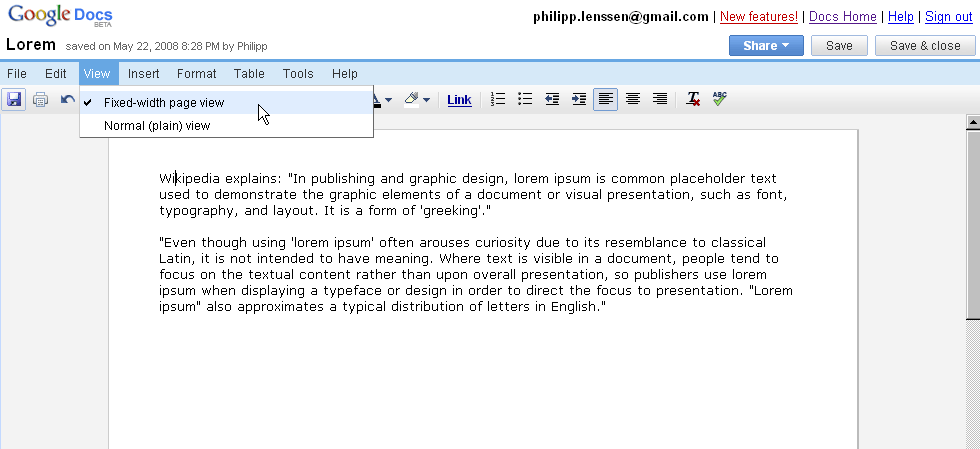
Fixed-Width Page View in Google Docs

It seems Google Docs has finally added a View menu which allows users to view their documents using the new fixed-width page layout or the standard full-width view. This layout was first spotted a couple of months ago when a screenshot was included in one of Google’s presentations.

Microsoft Office users will recognize this as being similar to the default “Print Layout” available in Word. However, although Google calls this the “Fixed-width page view” your document won’t actually be displayed in pages. Instead, you’ll just see one very long page...

Thursday, May 22, 2008

Public Presentations in Zoho Show

Public Presentations in Zoho Show

Zoho Show lets you view all public presentations in a single place. Public Presentations are the ones either created or imported to Zoho Show and made public by our users. These presentations are categorized as ‘Latest Presentations‘, ‘Popular Presentations‘ & ‘Featured Presentations‘. Of course, you can search presentations based on tags. You’ll find some really interesting material here across different topics.

publicpresentation.png

You can view your public presentations here after you login or @ http://show.zoho.com/public/

If you want to make your presentation public but don’t want to list it in this section, you can do so under the ‘Publish’ Menu with the ‘Remove from Public List’ option.

For every public presentation you have an option to comment, email or embed the presentation. You can also view related presentations or other presentations from the same author.

Wednesday, May 21, 2008

Zoho Show for your Remote Presentations

Using the web as platform allows for some very interesting possibilities. Like making a presentation to a world-wide audience sitting at your desk. Let’s see how you can use Zoho Show in doing such a remote presentation.

  • In your Zoho Show account, open the presentation that you need to present to your remote participants
  • Click on the Remote button
  • Give the ‘Email addresses of presentation attendees (Remote Users)’ in the pop-up dialog
  • You can set your own custom message for the email that is to be sent to the intended participants
  • Click Send button. The participants will receive your email with a link in it to click on
  • When you are ready to give the remote presentation, choose Start Remote from the Remote menu drop-down
  • The remote presentation gets started & your participants join in by clicking on the URL that got sent in your invite mail

You can chat with the participants in the chat window to the right. There are other options like Show Notes & Share this Desktop (other than the Zoho Show presentation, your whole desktop can be shared, which is done using Zoho Meeting, the web conferencing tool).

Try the Remote Sharing feature of Zoho Show & we will be glad hearing about it in the comments section below.

UPDATE : As always, Zoho fans are more thorough in explaining things than ourselves!

1. Amit Agarwal @ Digital Inspiration points to the advantages of Zoho Show’s remote feature - there’s no limit to the number of participants, you the presenter is always in full-control of the presentation & the participants need not have a Zoho account.

2. Richard Byrne notes that Zoho Show’s Remote feature “doesn’t require any software to be downloaded by you or your presentation attendees”.

Monday, May 19, 2008

Google reaching new heights in Taipei...

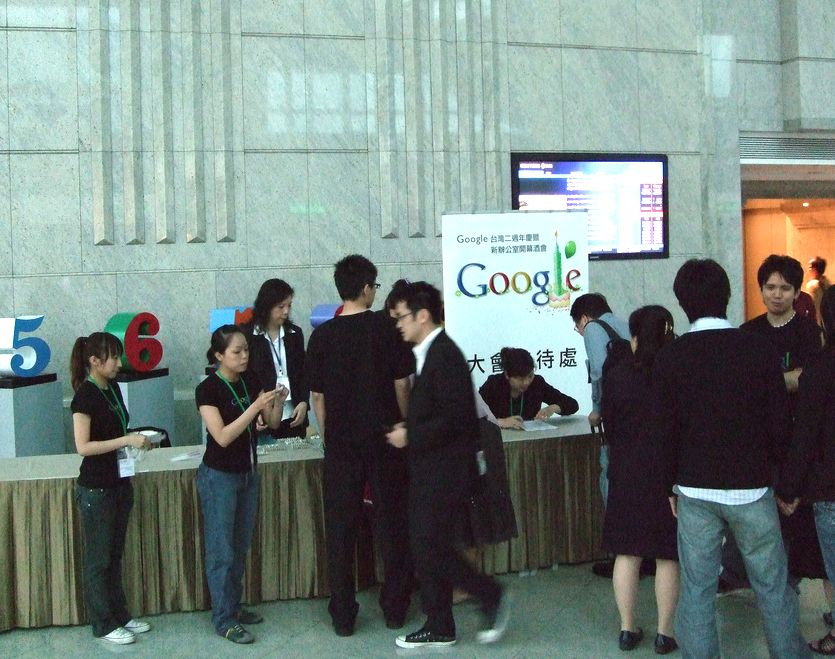
After apparently two years in Taiwan, Google recently moved their office from Taipei 101 – one of the world’s tallest skyscrapers* – from floor 37 to... floor 73. Not the uncoolest building in the world. Above picture was added by Yenwen Feng on May 5th, and is from the opening or anniversary ceremony.

The Taipei office is laid out in typical colorful Google style and includes ping pong and foosball tables. Pampering employees holds the benefit for the company that people may work longer or more effectively. Developer Aaron Swartz once argued that Google keeps employees by treating them like kids, while a commenter at Aaron’s post says “I have known a few people that worked there, and none of them struck me as infantile.” One Google employee named Andy told The China Post earlier, “For me [it’s] become so comfortable that I prefer it to my own home.”

Where Am I