Asfaar Burhaniyah 2.0

Asfaar Mubaraka of al Dai al Fatemi Syedna Mohammad Burhanuddin (tus) across the globe since 1424. (previous asfaar shall be added too insha allah as soon as possible.)The Placemark centered is the Current Location of His Holiness Dr. Syedna Mohammad Burhanuddin (TUS). comments are welcome.
Showing posts with label calendar. Show all posts

Tuesday, July 22, 2008

Offline Support For Gmail and Google Calendar

It seems that this year Google's most popular web applications will work offline. After Google Reader and Google Docs, two other services will integrate with Gears. Andrew Fogg saw a preview of the integration at Google's offices and found that Gmail and Google Calendar will add offline support in approximately 6 weeks.


In the past months, Google accidentally enabled the option in Google Calendar and some users saw the dialog illustrated below: "To view and edit the next 3 months of your Google Calendar when you're not connected to the Internet, click OK."


Screenshot licensed as Creative Commons by NOTICIAS-TIC.


Andrew also found out that Google will add SyncML support for Gmail contacts next month. He thinks this is "related to the sync that they worked on with Apple for 3G iPhone". SyncML is a standard for data synchronization supported by a lot of companies. "SyncML is most commonly thought of as a method to synchronize contact and calendar information between some type of handheld device and a computer (personal, or network-based service), such as between a mobile phone and a personal computer."

Wednesday, July 09, 2008

Google Calendar Buttons in Google Toolbar

I don't know if there are many useful buttons for Google Toolbar, but there's a Google Calendar button that offers a lot of features for its size.


1. You can use it as a shortcut for Google Calendar. Just click on the button, instead of trying to find Google Calendar in the list of bookmark or typing the first letters of its URL in the address bar.


2. Click on the small arrow next to Google Calendar's logo to see a list of upcoming events from your main calendar. If you select an event, you'll be able to read the description and make some changes.


3. Add events to your main calendar by typing the text in Google Toolbar's search box and then clicking on the calendar button. Unfortunately, Google doesn't add the event to your calendar, it only prefills a form with information from your request.


4. You can also add events by selecting some text from a web page and clicking on the calendar button (alternatively, right-click and select Send to > Google Calendar). Google Calendar to parse a lot of complicated text, including the one illustrated below:


For a visual representation of your calendars, you can add the Google Calendar gadget to the toolbar. The gadgets shows events from any number of your calendars and doesn't open a web page when you add an event.

Monday, July 07, 2008

Making the Best Better.

betterextensionupdates.png"Spent the long weekend posting a rash of "Better" extension updates that add features, fix bugs, and offer full Firefox 3 compatibility. If you haven't already, download your favorite "Better" Firefox extensions now:

  • Better Gmail 2
    Version 0.5.2: Updates and fixes the Redesigned skin; Adds Hide Gmail chat script.
  • Better Flickr
    Version 0.3: Adds Firefox 3 support, Rich Edit, Photo Page Enhancer, and Thumbnail Page Enhancer.
  • Better GCal
    Version 0.3: Adds the Redesigned skin beta by Globex Designs.
  • Better GReader
    Version 0.3: Adds Colorful List View; Updates the Minimalistic skin; Adds international domain support including google.co.uk, google.es, google.de, and others.
  • Better Lifehacker
    Version 0.2: Adds HTML Helper and Nested comment replies.
  • Better YouTube
    Version 0.4.3: Adds Firefox 3 compatibility; Fixes FlowPlayer (alternate, non-autoplaying player) and YouTube Theater view.
I have submitted all of these latest versions to Mozilla Add-ons, but most have not yet been approved, so to get the latest version you must get the download it the extension's homepage here on Lifehacker. You can use Firefox's "Find Updates" button too, but if you downloaded the extension from Mozilla Add-ons in the past, Firefox will not automatically find the update today if it has not been approved there yet. You must download it using the links above. As always, post your "Better" extension suggestions in the comments."

Friday, June 27, 2008

Google Calendar Phishing


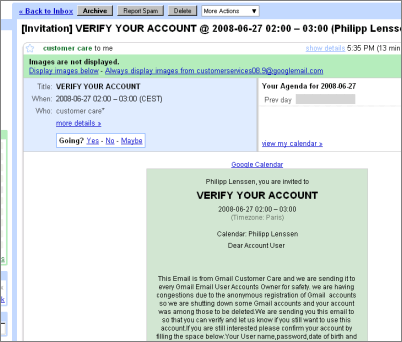
A couple of minutes ago an interesting attempt to phish for Google account credentials made it to my inbox. It had me blink my eyes because while I suspected phishing there were some things with this one that had me check twice to see how it’s done, as things looked quite official on the surface. As you may know, phishing emails are sent out by abusers to make the recipient in some way reply with their password or click through to enter their password, but the more official looking they are, the more easily they’re believed. This particular mail, shown in the screenshot, had the following attributes:

  • It was sent by “customer care”. OK, could be a lie.
  • It got my name right... might be just luck, as my name is included in my mail address.
  • It was sent with a layout that looked very official, and it even had an actual event from my calendar listed in the information (grayed out in the screenshot in the top right). Now this one was a bit more peculiar, because who else but Google would know my private calendar events?
The subject of the mail read “[Invitation] VERIFY YOUR ACCOUNT”, and the main content included this bit:
<
VERIFY YOUR ACCOUNT (...)

This Email is from Gmail Customer Care and we are sending it to every Gmail Email User Accounts Owner for safety. we are having congestions due to the anonymous registration of Gmail accounts so we are shutting down some Gmail accounts and your account was among those to be deleted.We are sending you this email to so that you can verify and let us know if you still want to use this account. (...)

You will have to confirm your E-mail by filling out your Login Information below after clicking the reply button, or your account will be suspended within 24 hours for security reasons.

* Username:

* Password:>>

It’s quite obvious Google’s not likely to send out such mails for real. You might have guessed by now how this was done, though: someone apparently set up a Google account with the first name “customer” and the surname “care” (the actual email address was customerservices[some-number]@googlemail.com). They then created an event in their calendar titled “VERIFY YOUR ACCOUNT” – instead of say, “BBQ at Susan’s place” – with the event description being the text printed above! Finally, they added me as guest to that event, which caused Google to prepare and send the event invitation mail!
Looking for traces of this phishing attempt online, I can see it’s not completely new, with people asking about this mail in e.g. May this year... and even receiving an official answer from Google, though this type of phishing remains. If you too ever receive a mail like this, here’s something you can do instead of actually replying: click the blue arrow to the top right of the Gmail message and pick “Report phishing”. A dialog will pop up explaining what phishing is, and it then says: “If you believe this message is a phishing attack, you can report it to our abuse team and help us thwart this attack and others like it.” Google notes though, “Reporting this message as an attack will send the entire message to our team for review.">>

Friday, June 06, 2008

Google Talk Labs Edition

Google Labs is indeed busy with their creativity. Recently they released Google Talk Labs Edition with Features of the Google Talk Gadget on your desktop (emoticons, group chat, and more!)
Key elements:
* the password letters are hidden with square blocks instead of rounded ones.
* Contacts and chat in the same window
* cool emoticons
* Desktop reminders from Orkut, Google Calender, Gmail.

Where Am I