
Google has added a new feature in its Lookup fromulas.
This time you can lookup for tournaments and pull the data to your spreadsheet.
The parameters include year, league, round, game, attribute and team.
Sports fans enjoy...!

 Google Spreadsheets add Google tournament in Google Lookup
 Chrome's homepages shows a window Link
I have just noticed that Google Chrome has added a new link under the Recently Closed Tabs group which says
window and it shows the favicons of all the windows currently open. On hovering over it, it will display the links..
 Google for the Colorblind
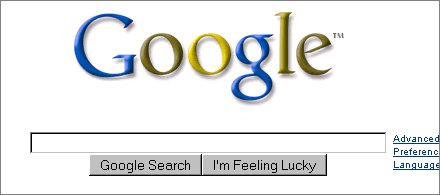
According to the Colorblind Web Page Filter, above is what Google.com looks like for users with protanopia (red/ green color blindness). Perhaps Google should run this as their logo one day to raise awareness of color blindness. Out of interest, does that logo look normal to anyone here/ is there anyone who’s colorblind here?
The Colorblind Filter site is a bit slow at the moment but if you created a website and you’re not color blind, you can check how well your intended color scheme fares. The site also has more information on how to select safer colors.
Free Alternative to 3ds Max, Google Sketchup - Microsoft trueSpace

trueSpace is a 3D modeling and animation software for Windows that lets you create realistic 3D scenes from scratch, walk-throughs, games, etc. You can also import characters created in other software like AutoCAD, 3ds Max, Adobe Illustrator, etc.
trueSpace used to sell for $600 but then Microsoft acquired the company and released trueSpace as a free download probably in response to SketchUp that’s owned by Google.

The idea is to let users create building and landscapes for Virtual Earth just like one can use SketchUp to create 3D models for Google Earth (SketchUp review).
If you are from the education community, you’ll especially love trueSpace for simulations.
Like with any other 3D authoring software, there’s a steep learning curve involved with trueSpace but if you are looking for a good alternative to 3DS Max or Blender, Microsoft trueSpace is available at a price that may be hard to beat.
Offline Support For Gmail and Google Calendar
It seems that this year Google's most popular web applications will work offline. After Google Reader and Google Docs, two other services will integrate with Gears. Andrew Fogg saw a preview of the integration at Google's offices and found that Gmail and Google Calendar will add offline support in approximately 6 weeks.
In the past months, Google accidentally enabled the option in Google Calendar and some users saw the dialog illustrated below: "To view and edit the next 3 months of your Google Calendar when you're not connected to the Internet, click OK."
Full-Screen Mode in Google Docs
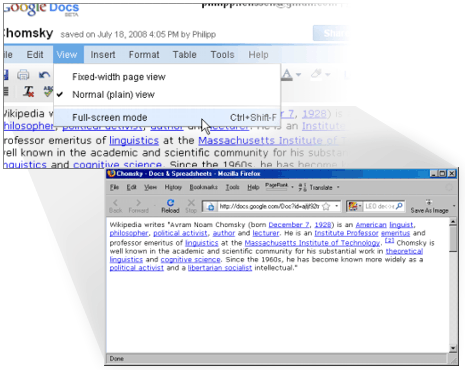
Pixelisation in the forum and Ionut at the Google Operating System blog mentioned the Google Docs documents editor now has a full-screen mode (not to be confused with the older full-width page view). You’ll find it in the menu View -> Full-screen mode, and hitting escape switches back to the default view. Does anyone know how to bookmark a Google Docs document so that it always opens in full-screen mode though?
Beijng Olympics - Google Mapified
Google Maps now has detailed map tiles for the major cities in China.
If you want to have a good look around the stadiums built for the Beijing Olympics 2008 you should visit EarthSwoop's Beijing Olympics collection of 3d buildings. EarthSwoop use the Google Earth Browser plug-in to show 3d buildings built for Google Earth.
I also received an e-mail today from noicon.biz to say that Google Maps in Japan has been updated to show the names of some houses and commercial locations. You can see this change in the screen-shot below where some buildings seem to have been tagged with little red dots. 
MS Office Alternatives - Analyzed
InfoWorld did a good analysis of MS Office alternatives (Slideshow here). They picked couple of vendors from the cloud (Zoho and Google) and couple from the Open Source world (IBM and OpenOffice) and did some analysis to see if they stand any chance against MS Office. Full article is available here. Here is the summary.

Bottom Line:The good news is, the applications are improving at a very rapid pace. If you have noticed, its been a while that we rolled out a new app. The focus lately has been more on integration between apps and enhancements to the existing ones. In the longer term, we think cloud based productivity suites can go far beyond desktop software. We’ll see this happen over the next year or two.
If you’re ready to embrace the SaaS future, then Zoho could be the productivity suite you’ve been waiting for. Zoho can provide both personal productivity and business back-end applications, and with Google Gears, you can keep working on documents even if you can’t find the Internet. Zoho is the only suite here that you could easily use to run a complete business. It’s also the only one that can run virtually all the Excel macros you might have developed
Google Docs Templates Directory
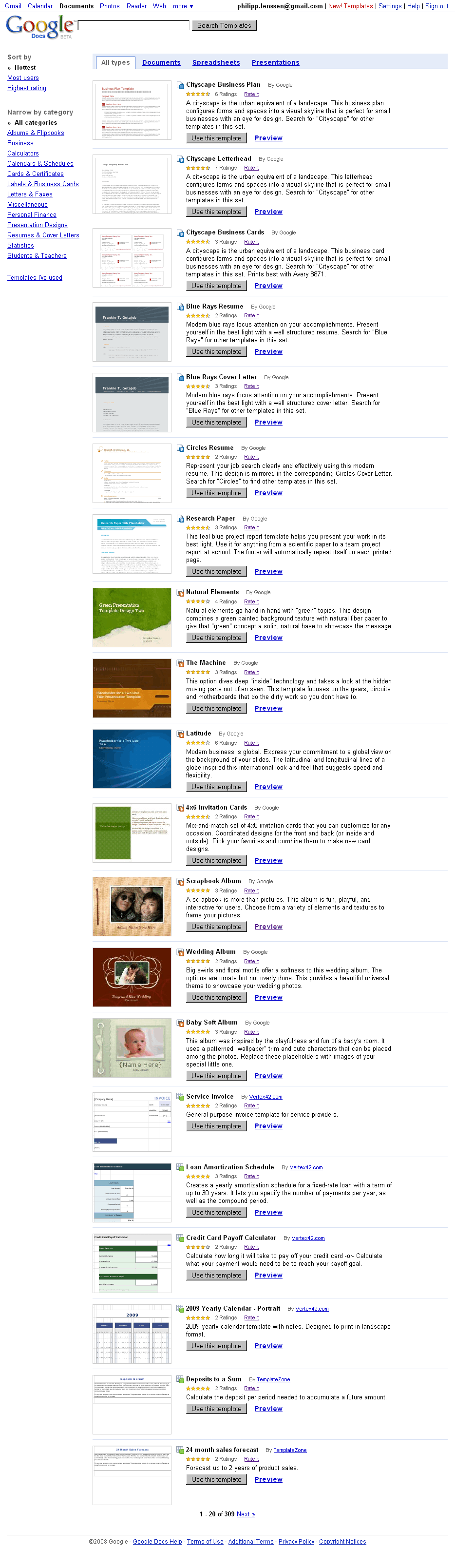
Google released a layout templates directory for Google Docs*, the application suite consisting of Google Documents, Spreadsheets and Presentations (Google’s kind of web-based light-weight Word, Excel and PowerPoint). You can sort templates by target application, like Spreadsheets, or by category, like “Resumes” or “Personal Finance”. Then you can look at a preview and if you like a style, hit the “Use this template” button to fill it with your own content.
Google Presentations since some time had a limited amount of basic designs available, and Google Documents also offers stylesheet editing, but this new directory presents a broader scope of layouts. There’s currently 309 different ones to pick from, and looking at the creator information you can see not all have been done by Google, but also by partnering third parties like TemplateZone or Avery.com.
[Thanks Pixelisation!]
*You can also reach the directory via docs.google.com by clicking New -> “From template”.
Google Lets You Search for Text in Some Videos
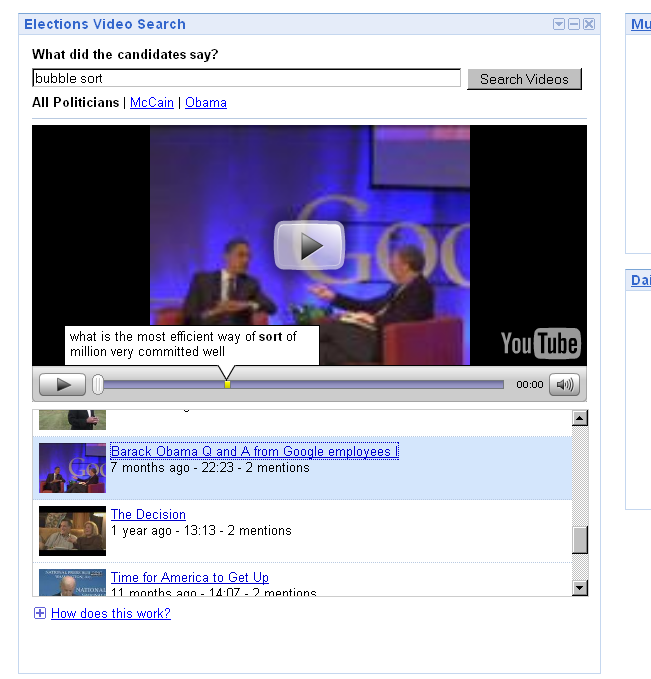
Google released a well-working iGoogle gadget in which they extract text information from video content. The Elections Video Search gadget – its standalone page can be accessed as well – lets you search for keywords across YouTube’s US politician channels, like Barack Obama’s. Clicking on a result item will load the video in question into the player embedded in the widget, with the specific occurrences of the word in the video color-marked on the timeline.
For instance, I searched for the word friendship and got a result titled “Obama Anniversary of Israeli Independence”. Moving the time bar line towards one of the yellow markers, I’m hearing Obama say, “... let us renew the friendship between our nations ...”. Another search for bubble sort returns a quip from a Q&A Obama held at the Google headquarters, where Obama is answering a programming question.
While the hits returned look precisely correct, hovering over the yellow marker pops up a snippet which shows Google doesn’t get it completely right... like when they transcribe a piece as “... to recognize Israel and are fighting for friendship wolf they ...”. Google admits as much in their blog post on this service, saying snippets “may not be 100% accurate”. They add that speech recognition “is a difficult problem that hasn’t yet been completely solved”.
This gadget shows that using speech-to-text technology, even when it’s very limited in scope right now, is a highly useful feature for video search. If and when Google ever rolls this out for all video content they indexed (or perhaps just for their YouTube content for starters), it could become an extremely interesting research tool. Besides just aiding search, extracting textual content from videos could also be used by Google to ...:
Google Sketchup Dwell Competition
It's my pleasure to announce the launch of the Design Your Dwelling Competition. We're co-hosting this design challenge with Dwell Magazine, a stylish and modern publication that focuses on good design as a means to better living. We're asking SketchUp users – and readers of Dwell – to think about what it means to feel "at home in the modern world" (the Dwell mantra). We challenge you to think about your idea of a comfortable and sustainable dwelling, and to share it with the world.
The building site has already been selected by the Dwell editors; it's in San Francisco, overlooking the Golden Gate bridge. If the judges consider your entry to be the best, you'll win a weekend trip to San Francisco to attend the Dwell/AIA home tours and be treated to lunch by the editors of Dwell magazine and the SketchUp team. If you need an excuse to spend some time having fun in SketchUp, this could be just what you're looking for. Be sure to submit your dream dwelling by August 31, 2008.
Visit the competition website for all the rules, prize information, design parameters and submission guidelines. Good luck, and we look forward to seeing your submissions.
Google Earth Imagery Update Quiz
Today I'm happy to announce that we've just finished pushing out an imagery update for all you Google Earth fans out there. As usual, I'll drop a few hints at where these updates might be, and tomorrow I'll post the complete list of updates.
1) Founded in 1608, this former British possession has a decidedly French flair.
2) Once the seat of great political power, this red fortress is now a major tourist attraction.
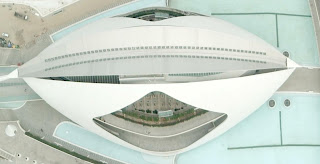
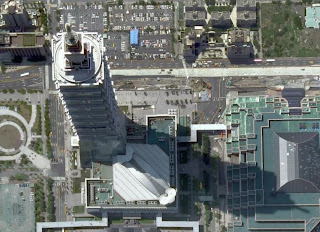
3) Now a UNESCO World Heritage Site, this city was lost to the world for 1700 years.

 Google Announces Indexing Support for SWFObject-embedded Flash
 The JavaScripted SWFObject is a popular way to include Flash files. Recently, Google announced better support for crawling Flash files, and in an update they added to their original post, they now also say: < On another note, Google adds: < |
Ground Art in Google Earth
Dutch artist Henk Hofstra has done a couple of interesting large outdoor "urban art" projects. The first is a "Blue Road". He painted 1000 meters of road in bright blue in Drachten, The Netherlands - on top was the phrase "Water is Life" written in eight-metre-high letters. The road was painted (using 4000 liters of paint) in April of 2007, and Hofstra hoped it would show up in Google Earth - but, the imagery for Drachten in GE is still dated 2005 currently (no new aerial or satellite photo has been acquired by Google for the area). I did notice the artist had some aerial photos taken of the road. I've placed one of the photos in a Photo Overlay for Google Earth - load this file  and double click on the placemark to be flown into the Photo Overlay where you can see how closely the photo of the Blue Road matches the road in Google Earth. Try the transparency slider to check the underlying imagery.
 More recently, in May of 2008, Henk Hofstra has done another outdoor art project called "Art-Eggcident". In this case he has created 100 foot wide fried eggs in a large square in Leeuwarden, The Netherlands. Some of the eggs even have 3D yolks kids can crawl on (see more photos). Amazingly, the city is allowing the art project to stay in place for the next 6 months. We can hope a proper orthographic aerial photo (straight down), or a satellite photo will capture this cool looking art project so it can be seen in the Google Earth images. But, in the meantime, I have again taken one of the aerial photos and made a Photo Overlay so you can see a photo of the Art Eggcident in its actual location in Google Earth.
This is just a reminder that if you do some large outdoor project you want to be visible in Google Earth. You can always take your own aerial photo and place it with the Photo Overlay or Image Overlay tools in Google Earth. That way it is still "immortalized".
Gmail - Suggested Contacts
Google has finally realized that it's a bad idea to automatically add to the list of Gmail contacts all the people you've sent an email. An updated version of Gmail's contact manager has a separate section for the people you've emailed: "suggested contacts".
"My Contacts is a place to import, store and view all of the contact information that's important to you. You can also create your own groups of contacts to easily email many people at once. We add people you've emailed to Suggested Contacts. You can move contacts from Suggested Contacts into My Contacts at any time."
There's an option to automatically move suggested contacts into My Contacts if you frequently email them, but the previous behavior doesn't seem to be an option. 
I don't have this new version of the contact manager, so if you notice other changes, post them in the comments.
Gmail Superstars - Tip For Gmail Crazy
One of the 13 features added to Gmail Labs in May is Superstars, an extension of Gmail's starring system. Instead of using a single star to flag all the messages, you can choose between 12 icons.
After enabling Superstars in Gmail Labs and clicking on "Save changes", go to the settings and select the icons you want to use. The exclamation mark is useful to flag important messages, quotes could show that a message needs a reply, while the info icon could be used for messages that contain valuable information.
To star messages faster, enable keyboard shortcuts in the settings. "The superstars will rotate when you press the 's' keyboard shortcut or when you click successively," explains Google. "Rotating through the superstars only works when you click (or hit 's') successively. If you pause for a second, then the next click will turn off the superstar. It's designed this way so that if you never click successively, then you'll just get the original on/off toggle behavior."
If you want to find the messages that have a certain kind of star, use one of the following queries:
has:yellow-star (or l:^ss_sy)
has:blue-star (or l:^ss_sb)
has:red-star (or l:^ss_sr)
has:orange-star (or l:^ss_so)
has:green-star (or l:^ss_sg)
has:purple-star (or l:^ss_sp)
has:red-bang (or l:^ss_cr)
has:yellow-bang (or l:^ss_cy)
has:blue-info (or l:^ss_cb)
has:orange-guillemet (or l:^ss_co)
has:green-check (or l:^ss_cg)
has:purple-question (or l:^ss_cp)
You can enable the Quick Links labs feature to save some of these queries so that they are always accessible with a single click. Just search for has:blue-star or any other value and click on "Add Quick Link".
GEB announces July 2008 Imagery Update for Google Earth
I've started getting reports of new imagery available in Google Earth today! The update is occurring as I write this because not everyone is seeing the new images yet, but it will probably be fully deployed within a few hours. Here are a few places I've confirmed (I will update this list as people tell me about other places - leave comments below please):
[UPDATED 1130, 1143, 1150, 1410, 2220 EDT]
Google Maps For YouTube
You have been able to search for YouTube videos whilst in Google Maps for a while now but until now YouTube has not had its own geographical search feature. This means that in the past when you searched for say Paris in YouTube you would be shown hundreds of videos by someone called Paris Hilton (who my girlfriend informs me is not actually a hotel in the French capital).
Now when you search for Paris in YouTube a small map appears next to the videos of a scantily clad woman.
When you click on the map you are then taken to a larger map with a red polyline circle. You can move the circle around or you can zoom in to focus on a smaller area and YouTube will look for videos geo-tagged in that area. 
This is an excellent addition to YouTube. It has been one of my biggest bugbears with the site that a search for a geographical location often returned videos that had no relation to the actual place.
Google Earth 4.3 (beta) Update Available - Version 4.3.7284.3916
There's a new version of Google Earth 4.3 (beta) available. This release does not appear to introduce new features, but it does address a number of issues some of you have encountered with GE 4.3 which was released in April. Since Google has had a couple of months, I'm expecting this version to be a more stable version to use. I'm still waiting for an official report and release notes, and will add the details here when they are available. See the official release notes for this update below. There's a lot of fixes to a variety of problems - many that only applied to certain OSes, or system configurations. Head on over to the official Google Earth Download page to get the latest (the "Check for Update" currently won't find this new release.)
See the initial review of Google Earth 4.3 for reasons why you should get the new version if you are still running an older version of Google Earth. Or, check out the GEB video demo of GE 4.3:
First 3D City in Spain for Google Earth - Roses
 Roses is the first city in Spain to get their entire city in 3D for Google Earth. The models are currently the basic gray buildings without textures. But, they are part of the Google Earth 3D Buildings layer. Just search for "Roses, Spain" to see for yourself. Google has a program called Cities in 3D (read more) to help city planners provide Google with data so their cities can be included in the layer. The program was just expanded to several European countries (including Spain) in early June. According to GEB reader Albert Garcia, they are also working to add SketchUp models with photo-textures for Roses.
Google has dozens of cities now where a large percentage of the urban area is modeled in 3D (more in the US than any other country at the moment). Here is a list of some cities in Europe where most of the city is in 3D: Zurich, Munich, Amsterdam, Hamburg, and Westport in Ireland. Berlin also has a huge 3D collection they created themselves, but it's not part of the built-in GE layer. Similarly, Dresden in Germany also did their own layer which is not yet part of the built-in layer. And, let's not forget, probably the most 3D data available for any country is in Japan. Nearly every structure for several major cities is rendered if you turn on the 3D Buildings layer and visit cities in Japan.

 Posts
All Comments
Posts
All Comments


