
Gmail Blog turns 1 - Happy Birthday Gmail Blog.
For the celebrations they have posted their Top 10 Gmail Tips for you. Catch these tip here if you have missed any. Here they are:
"When we launched the Gmail blog exactly one year ago, our goal was to provide you with new feature announcements, insight into how the Gmail team works, and tips on how to become a Gmail ninja. We hope you've enjoyed reading our posts, and to celebrate our birthday, here's a look back at the past year and a recap of our 10 most read tips:
10) Have Gmail do your laundry - How to suggest new features for Gmail. We always like hearing from you.
9) Tips for importing old email to Gmail - A post on how to make the switch to Gmail as seamless as possible.
8) Edit contacts right from your chat list - When we released the newest version of Gmail, it came with some new bells and whistles. This one will help you clean up your chat list and change contact information quickly.
7) 2 Hidden ways to get more from your Gmail address - You can insert certain characters to your email address to get additional names out of it -- all of which still make it to your inbox.
6) How to find any email with Gmail search - To take the best advantage of Gmail search, we explain how to use search operators so you can find any email the first time.
5) 5 little-known Gmail features you may not yet know about - When we released the newest version of Gmail, there were a bunch of really useful features people didn't yet know about. So we told you about them.
4) Top 10 little known Gmail features (and Part 2) - In this post, we explained ten Gmail features that people generally didn't know about. From "custom from" to creating events in Gmail, this post goes over key features any serious Gmail user needs to know.
3) Getting Gmail anywhere: IMAP versus POP - A lot of people choose to get Gmail on mobile phones and destkop mail clients, so we went over the two most popular ways people do so and showed the key benefits of using IMAP -- which we've provided for free since the fall.
2) 3 Gmail Labs features that will spice up your inbox - This post covers how to enable and use the most popular Gmail Labs features: Superstars, Pictures in chat and Quick Links.
1) 9 reasons to archive - From the sophisticated to the snarky, these tips fueled the most viewed post in Gmail blog history. If this doesn't get you to archive, then we don't know what will.
Friday, July 04, 2008
 Happy Birthday Gmail blog

Friday, June 27, 2008
Export Or Merge Your Multiple Blogger Blogs into One
 Q1: Do you have two or more blogs on Blogger and need to merge them into a single blog ?
Q2: Are you looking for a more simple option to backup all your blogger blogs including comments ?
Q3: Do you need to migrate your blog from Blogger to WordPress or another blogging platform ?
Q4: Do you want to move certain stories from your current blog into a new blog ?
If the answer to any of these question is yes, here’s something for you.
Blogger has added an Import / Export feature in Blogger that lets you backup your blogger blogs to the local hard drive as an XML file.

The XML file will have all the articles that you have written plus the reader comments. Now WordPress too has an Import Blogger feature but it ignores the comments so this latest Blogger feature will prove very useful.
To export your blogger blog, go to http://draft.blogger.com, login with your Google Account and use the Export link from the Settings | Basic tab. This would just save your blog to a text file, the blog would still remain on Blogger as it is. Full instructions here.
If you chose to import this XML file into a new (or existing) Blogger blog, the new posts remain unpublished by default though you can also republish them as soon as Blogger is done importing the file.
Google's Blogger Updates
It's raining with features in the experimental version of Blogger, available at http://draft.blogger.com. To try these new features, it's a good idea to visit Draft Blogger and temporarily enable "Make Blogger in Draft my default dashboard" at the top of the page.
Probably the most important new feature is the inline commenting system, that lets you post comments without opening a new page. This year, I tried using a pop-up window for the comment form, but it's still inconvenient to post comments. The new option, which can be added in the Draft Blogger by going to Settings > Comments > Comment Form Placement, uses an iframe to display a textarea and a list of authentication options:
I added the inline comment form to the template, so you can try it. For now, you can't preview the comment before posting it and I haven't figured out how to add the option to delete your comment.
Another extremely useful new feature lets you import and export your posts and comments. "Now you can export all of your posts and comments into a single, Atom-formatted XML file for easy backup. You can then import the posts back into Blogger, either into an existing blog or into a new one." The option is available in the Draft Blogger by going to Settings > Basic. Please note that the exported XML file can be quite large: for example, this blog's entire archive has 10.2 MB.
Blogger has a new post editor that borrows a lot of new tricks from Google Page Creator. You can move the images inside a post and dynamically choose between different sizes of the image. The new editor is smart enough to no longer replace newlines with
tags when you add tables, lists, styles, scripts and objects. There's also an improved preview option that uses your template to style your content. Unfortunately, the new editor lacks many features currently available: auto-save, spell checking, video upload and the toolbar for editing HTML.
Blogs that use the new layouts can add star ratings to get feedback from readers, but I'm not sure if this is a useful feature. There's also an option that integrates Blogger with Google Webmaster Central: you can automatically add all your Blogger blogs with a single click.
This is one of the biggest updates to Blogger and many of the new features are long overdue. If everything goes well, all these features will soon be available in the standard Blogger interface.
Thursday, June 12, 2008
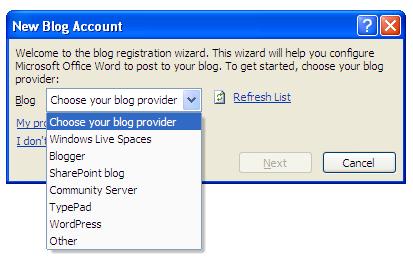
Create Blogs from MS Word - My first blog from MS Word 2007




Wednesday, June 04, 2008
Desktop Blogging from Linux

Paval is looking for a desktop based offline blog editing software for Linux (Ubuntu) – something on the lines of Windows Live Writer. Here are some suggestions from the extremely helpful Twitter community:
1. Scribefire – A hugely popular Firefox extension for blogging that lets you blog from the comfort of your browser. Supports almost every blog platform and is frequently updated.
2. Flock – This Firefox like browser has built-in blogging capabilities. Open the blog editor in the browser, drag-n-drop content from anywhere and publish.
3. Bleezer – This Java based WYSIWYG blog editing software can upload images to your web server and includes a spell checker but the developer has not updated the software since a long time.
4. BloGTK – This is a pretty popular blogging software for Linux that supports Blogger, Movable Type and WordPress but again, no new updates since long.
5. Drivel Journal – Another blog editor for the GNOME desktop though sort of abandoned now.
You may also consider blogging through Google Docs, imified for IM or even OpenOffice though the Sun Weblog Publisher add-in costs some money.
Saturday, May 31, 2008
Celebrating 100+ posts
Regards to all,
Today I am celebrating my blogging century as the posts count reach 100.
Although this blog had started in October 2004, but for some reasons it had been hibernating. Until it woke up once again this May. In the end of May - within a month - i have reached the 100 mark.
Hope the readers are Happy with the Posts too - Keep Reading.
Thankyou Readers,

 Posts
Posts


