
You have been able to search for YouTube videos whilst in Google Maps for a while now but until now YouTube has not had its own geographical search feature. This means that in the past when you searched for say Paris in YouTube you would be shown hundreds of videos by someone called Paris Hilton (who my girlfriend informs me is not actually a hotel in the French capital).
Now when you search for Paris in YouTube a small map appears next to the videos of a scantily clad woman.
When you click on the map you are then taken to a larger map with a red polyline circle. You can move the circle around or you can zoom in to focus on a smaller area and YouTube will look for videos geo-tagged in that area. 
This is an excellent addition to YouTube. It has been one of my biggest bugbears with the site that a search for a geographical location often returned videos that had no relation to the actual place.
Saturday, July 12, 2008
 Google Maps For YouTube

Monday, July 07, 2008
Making the Best Better.
 "Spent the long weekend posting a rash of "Better" extension updates that add features, fix bugs, and offer full Firefox 3 compatibility. If you haven't already, download your favorite "Better" Firefox extensions now:
- Better Gmail 2
Version 0.5.2: Updates and fixes the Redesigned skin; Adds Hide Gmail chat script. - Better Flickr
Version 0.3: Adds Firefox 3 support, Rich Edit, Photo Page Enhancer, and Thumbnail Page Enhancer. - Better GCal
Version 0.3: Adds the Redesigned skin beta by Globex Designs. - Better GReader
Version 0.3: Adds Colorful List View; Updates the Minimalistic skin; Adds international domain support including google.co.uk, google.es, google.de, and others. - Better Lifehacker
Version 0.2: Adds HTML Helper and Nested comment replies. - Better YouTube
Version 0.4.3: Adds Firefox 3 compatibility; Fixes FlowPlayer (alternate, non-autoplaying player) and YouTube Theater view.
Tuesday, June 24, 2008
Personalized Homepages in YouTube

In February YouTube began beta-testing its personalized homepages for individual users. Such personalization on YouTube was a long time coming, considering the advancements seen in other social media recommendation services and even third-party recommendation services that pertain directly to YouTube. Based on the feedback received in these past few months of beta-testing, YouTube is now ready to launch the personalized homepages with a few improvements.
The video recommendation system has likely been tweaked, though this hasn’t been explicitly stated by YouTube. If it were up to me, I’d say that the tweaks are unnoticeable — one of my recommendations was for the same video I’ve already favorited, just a copy that’s been uploaded by another user. Our Editor-in-Chief Adam Ostrow, however, had a much improved experience with his YouTube recommendations, which were accurate based on what he’d favorited.

Nevertheless, if repeat content could be minimized in recommendations, that would be a vast improvement for my personal experience (I know it’s hard, but eventually doable). The most notable improvement to YouTube’s personalization features would be the tweaks made to the email notification system.
Text for comments and messages are included directly in the body of these update emails, so you can see what these messages are without having to return to YouTube and logging in. I haven’t received any update emails from YouTube since this particular feature upgrade was rolled out, so I can’t say this for certain, but direct reply options for messages and comments via email would save users (especially power users) even more time.
Another perk for those power users: YouTube stated that its beta-testing data shows an increase in the number of users visiting the homepage, the frequency of visits and the number of subscriptions users make. So the new personalized homepages are starting to give some indirect marketing benefits for users pushing content through YouTube. If only we could all make money from it…
Wednesday, June 04, 2008
Video Interactions in YouTube - Annotations
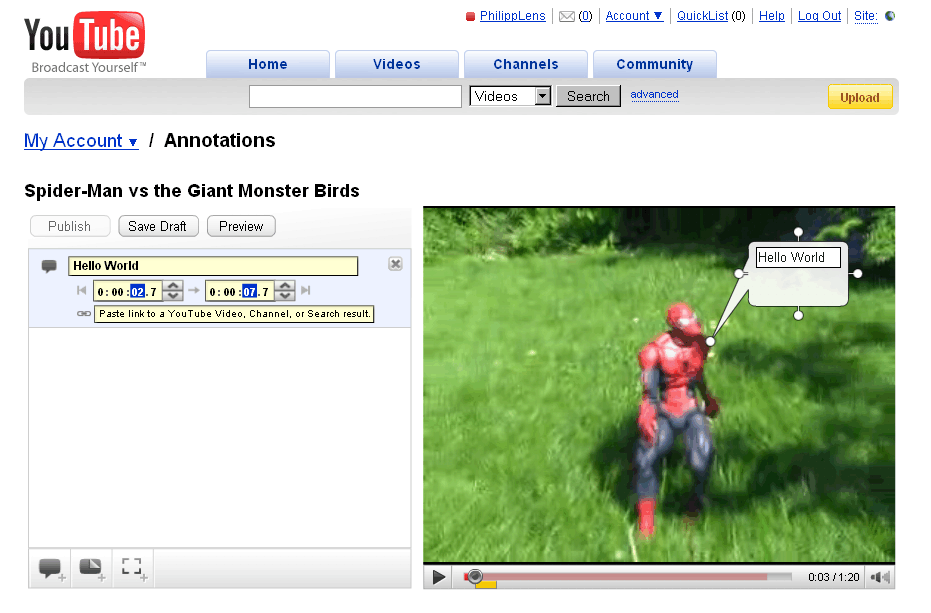
YouTube now offers video annotations, text bubbles created by the video owner which are overlaid on the video at specific times. To add an annotation to one of your own videos, check your videos listing and hit the “Edit Annotations” button next to one. You will be able to insert three types of annotations; “speech bubbles,” “notes,” and “spotlights.”
Also, you can add a link with each annotation. Those URLs may only point to YouTube though (I wonder if that’s greedy or if there’s a good reason for this). This feature also allows you to create interactive videos – like a video ending with a multiple choice question, leading to different other videos depending on where you click. Combining several of these videos, it would be possible to create a full-featured choose-your-own-adventure game... neat! (Be aware if you want to offer unique options, the work behind such an adventure will grow exponentially – having multiple paths merge again can help here.)
As a visitor, to turn off annotations in a given video like the Magic Card Trick video, click the bottom right arrow and hit the mysterious icon above it. Note that only video owners can add annotations; looking at the annoying results of other video sites which allow anyone to add annotations to a given clip, we might say luckily so.
Google Video upload is broken in the meantime

While Google-owned YouTube is adding features, Google-Video-as-video-host brings new troubles. Ever since the acquisition of YouTube, Google refocused their own old site to be a video search engine, not as much the place to upload your own things... this can be seen, for one thing, by the fact that almost all official Google blogs now post videos to YouTube instead of Google Video, and the closing down of their “best of Google Video” section as part of their Google Video blog. Google likes to promote to “eat your own dog food” in internal campaigns, but having two services in a competing area lets them now choose between different dog food brands.
For instance, just recently I tried to upload something to Google Video because while YouTube has better social features, I kind of prefer the Google Video player for technical reasons. After the video was uploaded using the web interface, I was waiting for it to go live. And waited. And waited. After a while, seeing the video was still not live, I switched to YouTube, and after the upload there, the video was then quickly showing live... whereas Google Video was still working on it, for some reasons (do they have human moderators checking each and every video, and if so, is the same true for YouTube?).
Now, news comes in via blogger Andy Baio that the upload is completely broken. I was able to reproduce this with an MPG video I uploaded (I recently spotted a cat across the street, which made for a good sample video). After the upload, Google’s video status nearly immediately said the video status was Live. Checking the live URL they link to, though, just results in this message: “We’re sorry, but this video may not be available. ... If this video was recently uploaded, it may still be processing. If this video is yours, you can check its status.” And that message won’t go away even after many hours, and that message is also appearing for other users of the service.
Looking at a Google Video Help thread (one of many), people are experiencing the upload problem since the middle of last month. In one thread, a Google support person has now chimed in saying “Our team is looking in to this and we’re hoping to get it fixed soon.”
The Google Video homepage itself also feels kind of deserted – even when there’s clearly developer activity on it, as the constant redesigns show. However, the video picks are sub-optimal. Just recently, the page was filled with Ultimate Fighting Championship videos including the fighter Kimbo... not that there’s anything wrong with that, but that lacked a bit of content diversity (and it was also not triggered by my own searches, as others saw the same). Today, there’s still two Kimbo videos up. And there is not a single video in the “hot videos” section which is hosted by Google Video; in fact, all but one are by Google-owned YouTube.
Below the hot videos is a “Featured on AOL” section which is nothing more but a partner section, and such partner sections don’t necessarily have the interests of the end user in mind... but the interest of the partner. An agreement Google once made with AOL as part of what Google called a “strategic alliance” included “showcasing AOL’s premium video service within Google Video.” Being in Germany, this also means I will get the message “The requested video cannot be displayed in your region" for many of those videos.
Once, Google Video was a destination to find captions of TV shows. Later, it became an opportunity to buy “Digital Rights Managed” videos in the US (and a good example of what may happen to your DRM content when such a service is canceled: the content ceases to exist). Both programs are ended by now, but the video hosting feature – which doubles Google’s efforts in this area if you consider YouTube – still seems to officially persist... even if it’s not working right now.
Annotations in YouTube
YouTube added a new feature for video creators: annotations. "Video Annotations are a new way for you to add interactive commentary to your videos. Use them to add background information about the video, create stories with multiple possibilities (viewers click to choose the next scene) or link to related YouTube videos, channels, or search results from within a video."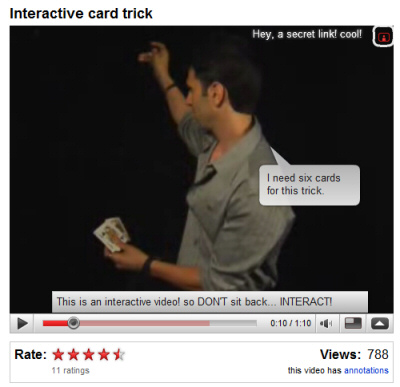
You can add annotations by going to the list of uploaded videos and clicking on "Edit annotations" or by visiting one of your videos while you are logged in. There are three types of annotations that can be added while playing the video: speech bubbles, notes and spotlights, as you can see in the screenshot above.
Here's a live example of interactivity that can be added to a YouTube video (also notice the updated embeddable player that looks the same as the player from YouTube's site). The following short video:
can be transformed into a much more engaging content with clickable annotations that point to other videos. For now, only video creators can add annotations, but it would be nice to allow any user to comment on a specific moment from a video (a la Viddler) or to add funny speech bubbles.
Tuesday, May 27, 2008
Google Shows Additional Information for Forums
via GOS
After displaying the published date for search results, Google experiments with showing more information about forum threads. Below the title, there's a new line with the following format:Discussion forum: number of posts - number of authors - date of the first post

Other search results that include special metadata:
* videos show a thumbnail, the duration and sometimes the average rating (on a related note, Google no longer lets you play videos inline)

Google slowly categorizes the documents from its index and starts to show additional information relevant for each category. We can expect to see extended snippets for blogs, news sites, shopping sites, scholar papers and even a way to restrict the results to a certain category. An experiment from last year grouped the search results in different categories: references, reviews, stores etc.
For now, the extended snippet for discussion boards is not live for everyone, but you can change your Google cookie to be a part of the experiment.


 Posts
Posts


