Asfaar Burhaniyah 2.0

Asfaar Mubaraka of al Dai al Fatemi Syedna Mohammad Burhanuddin (tus) across the globe since 1424. (previous asfaar shall be added too insha allah as soon as possible.)The Placemark centered is the Current Location of His Holiness Dr. Syedna Mohammad Burhanuddin (TUS). comments are welcome.
Showing posts with label videos. Show all posts

Wednesday, July 16, 2008

Google Lets You Search for Text in Some Videos


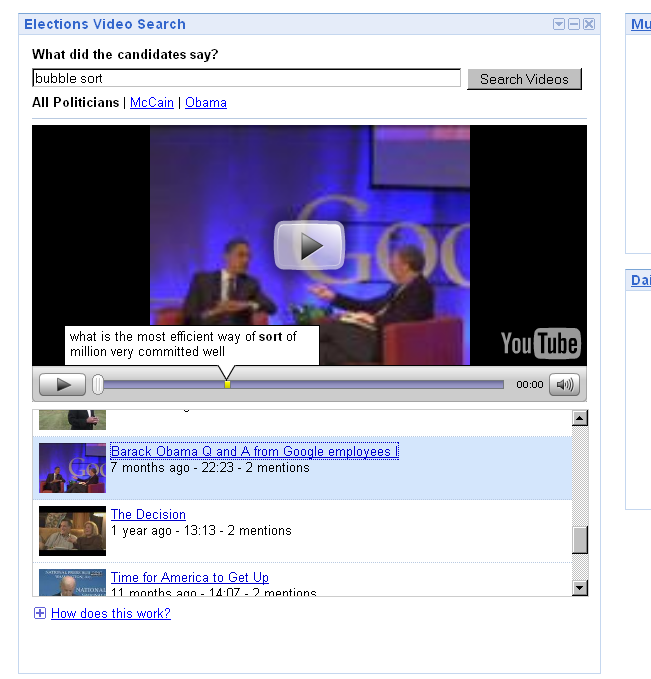
Google released a well-working iGoogle gadget in which they extract text information from video content. The Elections Video Search gadget – its standalone page can be accessed as well – lets you search for keywords across YouTube’s US politician channels, like Barack Obama’s. Clicking on a result item will load the video in question into the player embedded in the widget, with the specific occurrences of the word in the video color-marked on the timeline.
For instance, I searched for the word friendship and got a result titled “Obama Anniversary of Israeli Independence”. Moving the time bar line towards one of the yellow markers, I’m hearing Obama say, “... let us renew the friendship between our nations ...”. Another search for bubble sort returns a quip from a Q&A Obama held at the Google headquarters, where Obama is answering a programming question.
While the hits returned look precisely correct, hovering over the yellow marker pops up a snippet which shows Google doesn’t get it completely right... like when they transcribe a piece as “... to recognize Israel and are fighting for friendship wolf they ...”. Google admits as much in their blog post on this service, saying snippets “may not be 100% accurate”. They add that speech recognition “is a difficult problem that hasn’t yet been completely solved”.
This gadget shows that using speech-to-text technology, even when it’s very limited in scope right now, is a highly useful feature for video search. If and when Google ever rolls this out for all video content they indexed (or perhaps just for their YouTube content for starters), it could become an extremely interesting research tool. Besides just aiding search, extracting textual content from videos could also be used by Google to ...:

  • display related videos based on text content, even if that content is not available in the video’s text, description or tags
  • show other videos which contain the same quote, like a movie referenced in another movie
  • display more context-aware advertisement on places like YouTube
  • offer full textual transcripts of videos for easy, accessible copying (the quality of transcriptions must be higher for this than for the typical needs of search)
  • add PageRank to URLs being talked about
  • offer automated captions in a video
  • offer automated translated captions in a video, as Google is also doing work in statistical machine translation (and if you go a step beyond, text-to-speech technology in the future could even read the auto-translated transcription back to the user, delivering dubbing of videos)
Any of these features could have two effects: first, it could make Google Video or YouTube a more attractive place to search for and watch videos, and second, if a feature is only rolled out for YouTube (and if a content creator would like to have this feature for their video) it could make YouTube a more attractive place to upload videos.

Saturday, July 12, 2008

Google Maps For YouTube

You have been able to search for YouTube videos whilst in Google Maps for a while now but until now YouTube has not had its own geographical search feature. This means that in the past when you searched for say Paris in YouTube you would be shown hundreds of videos by someone called Paris Hilton (who my girlfriend informs me is not actually a hotel in the French capital).


Now when you search for Paris in YouTube a small map appears next to the videos of a scantily clad woman.


When you click on the map you are then taken to a larger map with a red polyline circle. You can move the circle around or you can zoom in to focus on a smaller area and YouTube will look for videos geo-tagged in that area.


This is an excellent addition to YouTube. It has been one of my biggest bugbears with the site that a search for a geographical location often returned videos that had no relation to the actual place.

Saturday, June 21, 2008

Suggestions on Your Google Video Search

The Google Video team continually strives to make your video search experience more enjoyable. In an effort to do so, we have added a suggestions feature to help you discover more interesting videos. Sometimes the suggestions expand the scope of your search, and sometimes they make your search more specific--it all depends on what you searched for and which suggestion you click on.

To view your search suggestions, click on the "Also try" links on top of the search results to refine or expand your search.


For example, if you are searching for "kittens", you may see suggestions like "cute kittens", "funny kittens", "newborn kittens", "techno kittens", "treadmill kittens" and so on. Clicking on these suggested search terms will lead you to the respective search results page, and another set of suggestions. If you continue following through these suggestion links, your first search may very well turn into hours of exploration.

The suggestions feature is available across all views - TV view, Grid view and List view. We hope that these suggested search terms will add a few different flavors to your search experience.

Wednesday, June 18, 2008

Skype 4.0 Beta with Video Chat


Windows only: Skype has released an early beta of their 4.0 release for Windows users, and the best word for it is bigger. The client itself is now a full-screen affair, putting your contact list at left and offering all the user options in a big central box. Video calls are both literally bigger, with full-screen streams and picture-in-picture chat, and a larger part of the client's focus. Hardware setup has also been streamlined to detect compatible hardware, or recommend it if troubleshooting fails. It's still an early beta—my XP box just couldn't run it without crashing—but worth checking out if you regularly use Skype video chat. Skype 4.0 beta is a free download for Windows systems only (for now).

Skype 4.0 Beta

Saturday, June 07, 2008

Google Video - Closed Captioning Search Options

Those of you interested in closed captioning may have noticed a new feature on this front- the ability to search only for closed-captioned videos. Naturally this is very useful for people like myself who can't hear the audio, but of course there are many others who either want the sound off or who can understand the writing better than the speech.

If you go to the "Advanced Video Search" page you'll see a new constraint called "Subtitles: Search only closed captioned videos". Try clicking on that check-box and doing an otherwise normal search; the results will include those videos that are known to have captions. Fun example: to see a list of all captioned videos on Google Video, check that box and restrict the domain to "google.com".

It's still not quite as sophisticated as we want it to be - it currently only knows about videos in Google Video, and doesn't yet allow you to specify a language of interest. Nevertheless it's another small step that we hope will encourage greater awareness and use of captions.

A related feature of interest that you may not have noticed is the ability to jump directly into a video at the point where captions of interest appear. If your search results include caption snippets, there will be a link called "Start playing at search term", which is extremely handy for long videos. In order to see it, you also have to select "List View" (the middle icon in the Results menu bar).

Here's a nice example - search for ["that's a tremendous gift"] . Make sure you've selected List View, and you should see a video featuring Randy Pausch. Clicking on the "Start playing at search term (50:16)" link will take you to a point slightly before the appearance of that caption.


Thursday, June 05, 2008

Google Earth has Disney World in 3D

Here is s a 3 minute video giving a quick tour of just the 3D Disney World Magic Kingdom - now all visible in Google Earth (read more about Disney in GE and how to turn it on):

Disney World in 3D in Google Earth
Popout

I captured the video straight from the Google Earth 3D window using Fraps and used a 3DConnexion SpaceNavigator to fly around and simulate a walking tour of the park. You get a sense of the incredible detail of the park - Disney's new additions are now one of the most densely packed 3D model collections now available in Google Earth. Unless you have a fast 3D game machine, you may notice the update rate will be a bit slow for this collection. My machine was a bit bogged down at times since it was also capturing the video.

Wednesday, June 04, 2008

Video Interactions in YouTube - Annotations

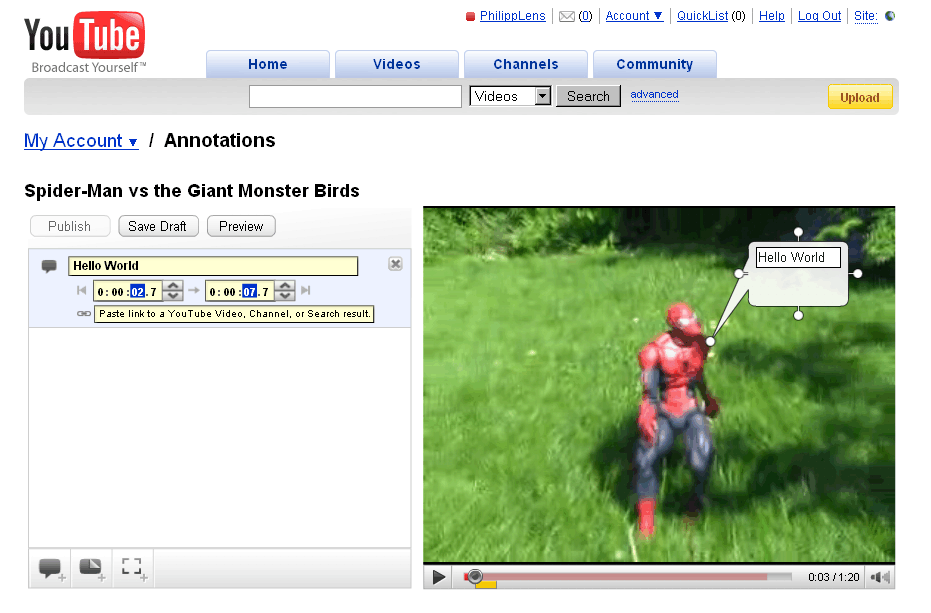
YouTube now offers video annotations, text bubbles created by the video owner which are overlaid on the video at specific times. To add an annotation to one of your own videos, check your videos listing and hit the “Edit Annotations” button next to one. You will be able to insert three types of annotations; “speech bubbles,” “notes,” and “spotlights.”

Also, you can add a link with each annotation. Those URLs may only point to YouTube though (I wonder if that’s greedy or if there’s a good reason for this). This feature also allows you to create interactive videos – like a video ending with a multiple choice question, leading to different other videos depending on where you click. Combining several of these videos, it would be possible to create a full-featured choose-your-own-adventure game... neat! (Be aware if you want to offer unique options, the work behind such an adventure will grow exponentially – having multiple paths merge again can help here.)

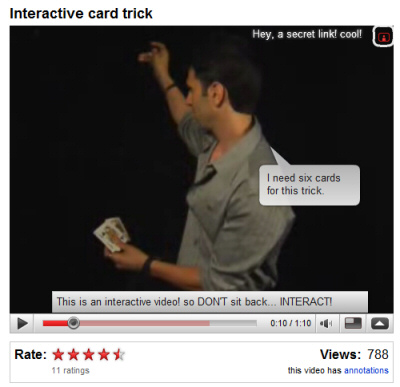
As a visitor, to turn off annotations in a given video like the Magic Card Trick video, click the bottom right arrow and hit the mysterious icon above it. Note that only video owners can add annotations; looking at the annoying results of other video sites which allow anyone to add annotations to a given clip, we might say luckily so.

Google Video upload is broken in the meantime

While Google-owned YouTube is adding features, Google-Video-as-video-host brings new troubles. Ever since the acquisition of YouTube, Google refocused their own old site to be a video search engine, not as much the place to upload your own things... this can be seen, for one thing, by the fact that almost all official Google blogs now post videos to YouTube instead of Google Video, and the closing down of their “best of Google Video” section as part of their Google Video blog. Google likes to promote to “eat your own dog food” in internal campaigns, but having two services in a competing area lets them now choose between different dog food brands.

For instance, just recently I tried to upload something to Google Video because while YouTube has better social features, I kind of prefer the Google Video player for technical reasons. After the video was uploaded using the web interface, I was waiting for it to go live. And waited. And waited. After a while, seeing the video was still not live, I switched to YouTube, and after the upload there, the video was then quickly showing live... whereas Google Video was still working on it, for some reasons (do they have human moderators checking each and every video, and if so, is the same true for YouTube?).

Now, news comes in via blogger Andy Baio that the upload is completely broken. I was able to reproduce this with an MPG video I uploaded (I recently spotted a cat across the street, which made for a good sample video). After the upload, Google’s video status nearly immediately said the video status was Live. Checking the live URL they link to, though, just results in this message: “We’re sorry, but this video may not be available. ... If this video was recently uploaded, it may still be processing. If this video is yours, you can check its status.” And that message won’t go away even after many hours, and that message is also appearing for other users of the service.

Looking at a Google Video Help thread (one of many), people are experiencing the upload problem since the middle of last month. In one thread, a Google support person has now chimed in saying “Our team is looking in to this and we’re hoping to get it fixed soon.”

The Google Video homepage itself also feels kind of deserted – even when there’s clearly developer activity on it, as the constant redesigns show. However, the video picks are sub-optimal. Just recently, the page was filled with Ultimate Fighting Championship videos including the fighter Kimbo... not that there’s anything wrong with that, but that lacked a bit of content diversity (and it was also not triggered by my own searches, as others saw the same). Today, there’s still two Kimbo videos up. And there is not a single video in the “hot videos” section which is hosted by Google Video; in fact, all but one are by Google-owned YouTube.
Below the hot videos is a “Featured on AOL” section which is nothing more but a partner section, and such partner sections don’t necessarily have the interests of the end user in mind... but the interest of the partner. An agreement Google once made with AOL as part of what Google called a “strategic alliance” included “showcasing AOL’s premium video service within Google Video.” Being in Germany, this also means I will get the message “The requested video cannot be displayed in your region" for many of those videos.

Once, Google Video was a destination to find captions of TV shows. Later, it became an opportunity to buy “Digital Rights Managed” videos in the US (and a good example of what may happen to your DRM content when such a service is canceled: the content ceases to exist). Both programs are ended by now, but the video hosting feature – which doubles Google’s efforts in this area if you consider YouTube – still seems to officially persist... even if it’s not working right now.

Annotations in YouTube

YouTube added a new feature for video creators: annotations. "Video Annotations are a new way for you to add interactive commentary to your videos. Use them to add background information about the video, create stories with multiple possibilities (viewers click to choose the next scene) or link to related YouTube videos, channels, or search results from within a video."


You can add annotations by going to the list of uploaded videos and clicking on "Edit annotations" or by visiting one of your videos while you are logged in. There are three types of annotations that can be added while playing the video: speech bubbles, notes and spotlights, as you can see in the screenshot above.


Here's a live example of interactivity that can be added to a YouTube video (also notice the updated embeddable player that looks the same as the player from YouTube's site). The following short video:

Popout

can be transformed into a much more engaging content with clickable annotations that point to other videos. For now, only video creators can add annotations, but it would be nice to allow any user to comment on a specific moment from a video (a la Viddler) or to add funny speech bubbles.

Saturday, May 31, 2008

View Google Videos Uninterrupted

We know a lot of you are committed multi-taskers, and hey, who doesn't love the TV view for efficient video searching? To make you even better multi-taskers, we've added a feature that allows you to browse through multiple results pages, sort, filter or refine your search query- all without interrupting the video you're watching. The list and grid views also inherit this feature.

We hope that this feature will make your video searching and viewing more enjoyable.

Follow these steps to check it out:

1. Conduct a search using any query and click on a result to play a video.
2. While the video is playing, scroll to the bottom of the results and click back and forth between the pages of results. For example, click "Next" or "Previous", or click on the page number.
3. You can also go to the search box at the top and perform a new search. New results will be displayed, but the current video keeps playing.


via Official Google Video Blog
Related Posts:
Google Video's Player Detached from Search Results

Wednesday, May 28, 2008

Google Street View Cars on Video

Popout

Popout

According to the descriptions on YouTube, the first video is a Google Street View car in Seville, Spain, and the second is one around Palm Springs, California, US. These cars from the Google fleet have a camera mounted on top to photograph the panorama views that are later added to Google Maps. It’s like the first Googlebots spotted in the wild, and perhaps signs of a future to come in which devices of different shapes and functionality roam the streets to collect information (compare with this fiction).

Rendering all that information back to us in the many of Google’s services may hold much fascinating use; at the same time, considering that Google’s technology may advance and they say they may hand over their collected data of public or private nature to governments if required by law (and they also say they may not always disclose when that happens)*, this is a future that may also get some worried... if ever a government turns against its citizens.

In other related news, according to German Focus, Google also wants to bring Street View cars to Germany, as they are doing for other European countries. Both faces and car license plates would be blurred, Google’s Peter Fleischer argued.


*Google’s privacy policy says that Google may share “personal information with other companies or individuals outside of Google” when they have “good faith belief” that it satisfies “any applicable law, regulation, legal process or enforceable governmental request”. Furthermore, a clause in the US Patriot Act, according to the American Civil Liberties Union, contains a bit prohibiting anyone who receives a National Security Letter from “disclos[ing] to any person that the [FBI] has sought or obtained access to information or records.” Google in a PDF FAQ (which I can’t access anymore at the moment) on the question “How many subpoenas for server log data does Google receive each year?” answered, “As a matter of policy, we don’t provide specifics on law enforcement requests to Google.”

Tuesday, May 27, 2008

Download Multiple Web Videos Stitched Into a Single Movie or MP3

While
there are tons of tools that let you download web videos with ease,
MovAVI offers one unique feature - it can join multiple videos from
YouTube, Metacafe, Break.com, etc. into one single file all by itself
that you can later download in any format.


join multiple videos


Using Movavi is simple - just add the different video URLs (5 is the
limit) and select an output format. You can either request the combined
video clip as an MP3 audio file (great for music videos) or in regular
formats like iPod MP4, AVI, Flash Video & Quicktime.


Movavi will not join your videos instantly - it sends out an email
when the video to ready for download. If you are looking for instant
conversion, check this Flash Video Guide. MovAVI can also be used to join video files that reside on your local hard drive.

Google Video's Player Detached from Search Results

The default view for Google Video, TV view, has been updated and you can now search for videos without interrupting the video that is already playing. You can go to the next page of results or reformulate your query, while still watching a video.

You'll also notice that Google Video can play videos inline not only from Google's sites, but from many other popular video sites (some notable exceptions: AOL Video, MySpace, Yahoo Video).


Google Video started by close-captioning TV shows, then moved to hosting videos, searching videos on the web and now the natural evolution is to come full circle back to close-captioning videos. Maybe in the future Google Video will bring back playlists and we'll be able to watch a selection of videos, like in YouTube Fast Search.
via GOS

Google Shows Additional Information for Forums

via GOS

After displaying the published date for search results, Google experiments with showing more information about forum threads. Below the title, there's a new line with the following format:

Discussion forum: number of posts - number of authors - date of the first post


The extended snippet categorizes the search result and indicates its potential usefulness: for example, a thread that has a single post or a single author is not very useful.

Other search results that include special metadata:

* videos show a thumbnail, the duration and sometimes the average rating (on a related note, Google no longer lets you play videos inline)


* Google Books results show the author, the published date, an important category and the number of pages

Google slowly categorizes the documents from its index and starts to show additional information relevant for each category. We can expect to see extended snippets for blogs, news sites, shopping sites, scholar papers and even a way to restrict the results to a certain category. An experiment from last year grouped the search results in different categories: references, reviews, stores etc.

For now, the extended snippet for discussion boards is not live for everyone, but you can change your Google cookie to be a part of the experiment.

Friday, May 23, 2008

Amazing uses of Google Maps - website

Google have today announced a video site that will highlight some of the amazing ways that web sites have used Google Maps. At the moment the site only includes three examples KPBS, Trulia and Kayak but Google promises many more soon.

Here is the Trulia video:

Popout

Thursday, May 15, 2008

Explore places with photos, videos, and more

Via - Google Latlong

Do you ever visit Google Maps and sometimes get caught up browsing for interesting places? Maybe daydream about getting away, or reflecting back on that awesome vacation you took?

I'm pleased to announce the launch of a new feature that makes it more interesting for users to browse and explore different places on Google Maps. With this feature, you can explore an area by viewing photos, videos, user-created maps, and suggested local queries.

Start by searching for any location, such as Solvang, CA. You can see from the photos and popular searches that it's a place known for its Danish roots and wineries:

Click "Explore this area" and you'll find more content, which automatically updates as you pan and zoom the map. Keep dragging and zooming to explore interesting new places!

The development team hopes that you'll enjoy the feature and find some content on Google Maps that you hadn't noticed before. As we worked on this feature, we found ourselves daydreaming and exploring various places, so we'd like to share some of our favorites:

I'll leave you with a video that gives you a taste of the new feature. Now go exploring!

Popout

Where Am I